Documentation Index

Fetch the complete documentation index at: https://docs.oration.ai/llms.txt

Use this file to discover all available pages before exploring further.

Overview

The Oration Widget SDK is a lightweight, embeddable web component (<oration-widget>) that adds AI voice and chat agents to any website. No framework or build step required — just a script tag.

Quick start
<body>
    <oration-widget public-key="your-public-key" default-agent-id="your-agent-id">
    </oration-widget>
    <script src="https://unpkg.com/@oration/widget/dist/index.umd.js"></script>
</body>
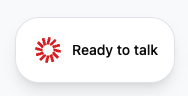
Widget initial view - Ready to talk button

Getting your keys

  1. Public key — copy your workspace public key from the Oration Dashboard
  2. Agent ID — create an agent and copy its ID from the agents section

Configuration

Required attributes

AttributeTypeDescription
public-keystringYour Oration workspace public key
default-agent-idstringThe agent ID to use for conversations

Optional attributes

AttributeTypeDefaultDescription
conversation-typestring"web""web", "chat", or "both"
agent-language-id-mapJSON stringMap of BCP-47 language codes to agent IDs
sizestring"full""full" (380px) or "tiny" (260px)
positionstring"bottom-right""bottom-right", "bottom-left", "top-right", "top-left"
color-modestring"system""light", "dark", or "system"
themeJSON stringCustom theme colors (see Theme customization)
dynamic-variablesJSON stringRecord<string, string> passed as session context to the agent
logostringURL of a custom logo to replace the default
animate-logobooleantrue for default logo, false for customControl logo spin animation
main-labelstringOverride the initial “Ready to start” label
orb-colorstringHex color for the AI orb (e.g. "#2563eb")
require-terms-acceptancebooleanfalseShow a terms acceptance gate before the first conversation
terms-textstringCustom terms text (used when require-terms-acceptance is enabled)
enable-dtmfbooleanfalseShow a DTMF numpad during voice calls

Conversation types

Web mode (default)

Real-time voice conversation.
<oration-widget
    public-key="pk_your_public_key_here"
    default-agent-id="asst_your_assistant_id_here">
</oration-widget>
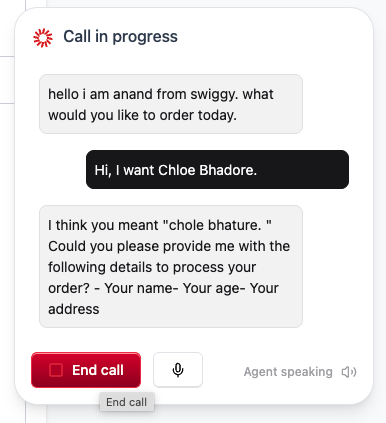
Widget in voice conversation mode with live transcript

Chat mode

Text-based chat interface.
<oration-widget
    public-key="pk_your_public_key_here"
    default-agent-id="asst_your_assistant_id_here"
    conversation-type="chat">
</oration-widget>
Widget in chat mode with text conversation

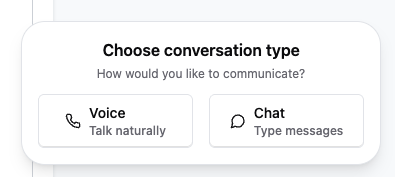
User choice mode

Lets users pick between voice and chat.
<oration-widget
    public-key="pk_your_public_key_here"
    default-agent-id="asst_your_assistant_id_here"
    conversation-type="both">
</oration-widget>
Widget conversation type selector - Voice or Chat options

Widget sizes

ValueWidthUse case
"full" (default)380pxStandard widget with full UI
"tiny"260pxCompact, minimal footprint
Tiny widget size during voice conversation

Multi-language support

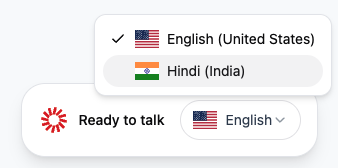
Map BCP-47 language codes to specific agent IDs. A language selector will appear in the widget when the map contains at least one entry.
<oration-widget
    public-key="pk_your_public_key_here"
    default-agent-id="asst_english_agent_id"
    agent-language-id-map='{"en-US": "asst_english_agent_id", "es-ES": "asst_spanish_agent_id", "hi-IN": "asst_hindi_agent_id"}'>
</oration-widget>
Widget with language selector dropdown showing English and Hindi options Agent selection logic:
  • If agent-language-id-map is provided, the map takes priority over default-agent-id
  • If default-agent-id exists as a value in the map, it is pre-selected
  • Otherwise the first entry in the map is used as the default

Dynamic variables

Pass context to your agent using the dynamic-variables attribute. Values must be a JSON object of string key-value pairs.
<oration-widget
    public-key="pk_your_public_key_here"
    default-agent-id="asst_your_assistant_id_here"
    dynamic-variables='{"userId": "12345", "plan": "pro", "name": "John Doe"}'>
</oration-widget>
Variables are available in session metadata during the conversation. Common uses: user identification, current page context, subscription tier, A/B test variant.

Programmatic updates

const widget = document.querySelector('oration-widget');

widget.setAttribute('dynamic-variables', JSON.stringify({
    userId: "67890",
    plan: "enterprise",
    currentPage: "/checkout"
}));

Theme customization

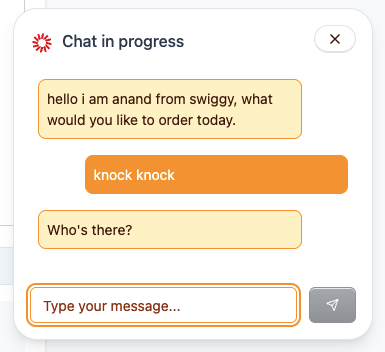
Pass a JSON object to theme with any subset of the following keys. Missing keys fall back to defaults.

Theme keys

KeyRole
basePrimary background
base_hoverHover state background
base_activeActive/pressed state background
base_borderBorder color
base_subtleSecondary / muted text
base_primaryPrimary text
base_errorError states
accentPrimary accent (buttons, highlights)
accent_hoverAccent hover
accent_activeAccent active/pressed
accent_borderAccent border
accent_subtleMuted accent elements
accent_primaryText on accent backgrounds
All values must be hex color strings.
<!-- Minimal: just override accent -->
<oration-widget
    public-key="pk_your_public_key_here"
    default-agent-id="asst_your_assistant_id_here"
    theme='{"accent": "#2563eb"}'>
</oration-widget>
<!-- Full theme -->
<oration-widget
    public-key="pk_your_public_key_here"
    default-agent-id="asst_your_assistant_id_here"
    theme='{
        "base": "#ffffff",
        "base_hover": "#f8fafc",
        "base_active": "#f1f5f9",
        "base_border": "#e2e8f0",
        "base_subtle": "#64748b",
        "base_primary": "#0f172a",
        "base_error": "#ef4444",
        "accent": "#2563eb",
        "accent_hover": "#1d4ed8",
        "accent_active": "#1e40af",
        "accent_border": "#1e3a8a",
        "accent_subtle": "#64748b",
        "accent_primary": "#ffffff"
    }'>
</oration-widget>
Widget with custom orange theme applied to chat interface

Color mode

Use color-mode to force light or dark theme, or let the widget follow the user’s system preference:
<oration-widget color-mode="dark" ...></oration-widget>

External button trigger

Any element with id="oration-conversation-trigger" will open the widget when clicked. The trigger respects the widget’s current state (no-op while connecting).
<button id="oration-conversation-trigger">Start AI Conversation</button>

<oration-widget
    public-key="pk_your_public_key_here"
    default-agent-id="asst_your_assistant_id_here">
</oration-widget>

<script src="https://unpkg.com/@oration/widget/dist/index.umd.js"></script>
If conversation-type="both", the trigger shows the conversation type selector first.

Terms acceptance

Show a consent gate before the first conversation. Acceptance is stored in localStorage and won’t be shown again.
<oration-widget
    public-key="pk_your_public_key_here"
    default-agent-id="asst_your_assistant_id_here"
    require-terms-acceptance="true"
    terms-text="By continuing, you consent to the recording of this conversation.">
</oration-widget>

Troubleshooting

Widget not loading — check the browser console, verify the script tag is present, and confirm your public key and agent ID are correct. Styling issues — the widget uses Shadow DOM for style isolation. Custom styles must go through the theme attribute. No microphone access — browser microphone permissions must be granted for voice conversations. Conversation fails — verify the agent is configured and your workspace has sufficient credits.
Your public key is visible in client-side code. Only use it on authorized domains. Never expose private API keys in the browser.

Need help? Contact us at support@oration.ai