

Overview
Scorecards in Oration AI are automated quality assessments that score each conversation based on criteria you define. Instead of manually reviewing calls for quality, the AI evaluates them for you—checking if your agent followed guidelines, stayed on-brand, and met your service standards.1. Creating a Scorecard
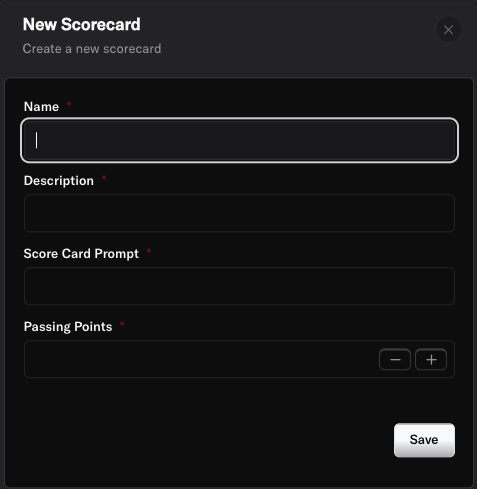
- Name: Give your scorecard a descriptive name (e.g., “Customer Support Quality Standards”).
- Description: Explain what this scorecard evaluates (e.g., “Evaluates agent performance on customer service quality, brand compliance, and issue resolution”).
- Scorecard Prompt: Provide instructions to guide the AI on how to evaluate conversations. This tells the system what to look for and how to assess quality.
- Passing Points: Set the minimum score required to pass the evaluation. For example, if your total scorecard is worth 100 points, you might set passing at 80.
2. Adding Evaluation Questions
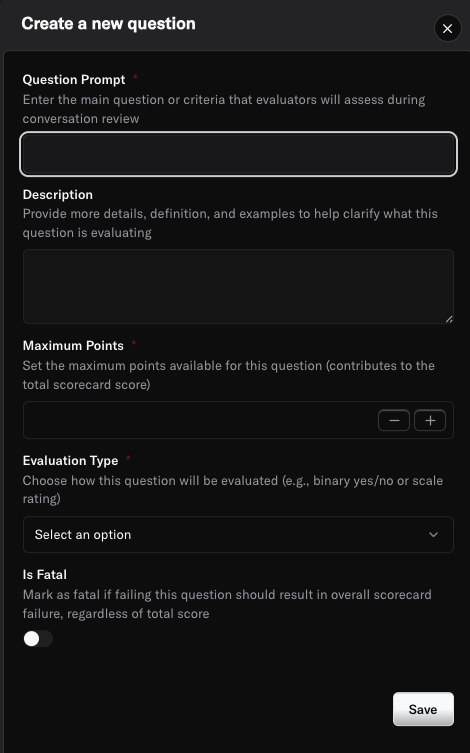
- Question: The specific criteria being evaluated (e.g., “Did the agent greet the customer professionally and introduce themselves?”).
- Description: Provide detailed guidance on what to look for (e.g., “Agent should say hello, state their name, and offer assistance”).
- Max Points: Assign the maximum points this question is worth (e.g., 10 points).
- Evaluation Type: Choose between:
- Score: For questions requiring a numerical rating
- Pass/Fail: For yes-or-no criteria
- Fatal Question: Toggle this on if failing this specific question should automatically fail the entire scorecard, regardless of other scores. This is perfect for critical requirements like compliance or safety issues.
3. Attaching Scorecards to Agents
Once your scorecard is ready, you need to attach it to one or more agents:- Navigate to your agent’s page from the Agents section.
- Click on the Quality Assurance tab.
- Click Add Scorecard and select the scorecard you created.
- Specify the percentage of conversations where you want QA to be applied (e.g., 100% for all conversations, or 20% for a sample-based approach).
4. Reviewing Scorecard Results
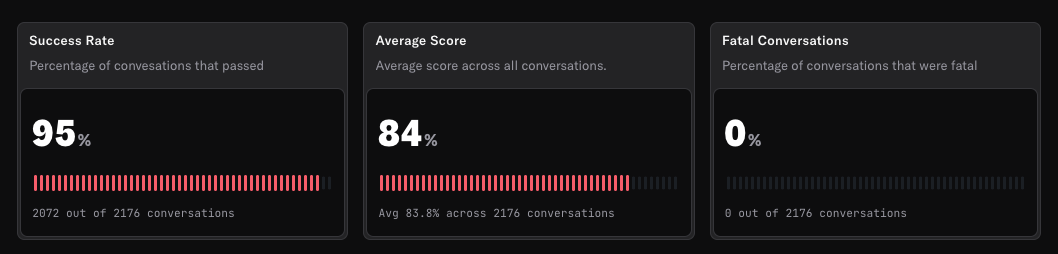
- Total Score: The overall score achieved out of the maximum possible points.
- Pass/Fail Status: Whether the conversation met the passing threshold.
- Question-by-Question Breakdown: Individual scores and evaluations for each question in your scorecard.
- AI Reasoning: Explanations for why certain scores were assigned.
Best Practices
- Define clear, measurable criteria in your scorecard questions to ensure consistent evaluations.
- Use Fatal Questions sparingly for only the most critical compliance or safety requirements.
- Start with key metrics that matter most to your business (greeting quality, issue resolution, brand compliance).
- Regularly review scorecard results to identify training opportunities and areas for improvement.
- Update scorecards as your business needs and quality standards evolve.
- Balance automated QA with periodic manual reviews to ensure the AI is evaluating correctly.
- Consider sampling (e.g., 20% of conversations) if you have high call volumes, then increase to 100% for critical agents.
Need more help? Reach out to our team at support@oration.ai