

Overview
Evaluations (Evals) in Oration AI provide a powerful testing environment that lets you validate how your AI agents handle different scenarios before deploying them to real customers. With Evals, you can catch issues early and ensure your AI agents deliver consistent, accurate responses across every customer interaction.1. Creating Evaluation Suites
Evaluation Suites help you organize your tests into comprehensive collections that cover all critical aspects of your AI agent’s performance. To create a new evaluation suite:- Navigate to Evaluation Suites in the left sidebar.
- Click the Create Suite button in the top right corner.
- Give your suite a descriptive name (e.g., “Customer Support Flow Tests” or “Booking Agent Validation”).
- Add a description explaining what scenarios this suite covers.
- Select the agent you want to test.
2. Next Reply Evaluations
Next Reply evaluations test individual responses to verify your agent provides appropriate answers in specific conversation contexts. When to use: Use Next Reply evaluations when you want to test how your agent responds to a single message or specific user input. How to create:- Open your evaluation suite and click Add Evaluation.
- Select Next Reply as the evaluation type.
- Name your test: Give it a clear, descriptive name (e.g., “Greeting Response Test”).
- Set conversation context: On the right side, under ‘Chat Messages’, provide any previous messages that set up the scenario.
- Define success criteria: Describe what makes a response acceptable. Be specific about required information, tone, or actions.
- User Message: “I am busy right now”
- Success Criteria: Agent should respond with a polite message that they will call back later. Agent should not ask any further questions
- Success Example: “No problem, I’ll call back later.”
3. Tool Invocation Evaluations
Tool Invocation evaluations ensure your agent calls the right tools at the right times during customer interactions. When to use: Use Tool Invocation tests when your agent needs to trigger specific functions, APIs, or integrations based on user requests. How to create:- In your evaluation suite, click Add Evaluation.
- Select Tool Invocation as the evaluation type.
- Name your test: Provide a descriptive name (e.g., “Order Lookup Tool Test”).
- Set conversation context: Add any previous conversation history needed for both User and Agent.
- Specify expected tool: Select which tool should be invoked.
- Context: Agent has asked for order number
- User Message: “My order number is 12345”
- Expected Tool:
lookup_order - Success Criteria: Agent should invoke the lookup_order tool with the correct order ID extracted from the user’s message.
4. Conversation Evaluations
Conversation evaluations simulate complete multi-turn interactions from start to finish, following defined scripts to test your agent’s ability to handle realistic customer journeys. When to use: Use Conversation evaluations for end-to-end testing of complete customer scenarios, including multiple exchanges, tool calls, and resolution flows. How to create:- In your evaluation suite, click Add Evaluation.
- Select Conversation as the evaluation type.
- Name your test: Provide a descriptive name (e.g., “Complete Booking Flow”).
- Build conversation script: Add multiple turns of conversation:
- User messages
- Expected agent responses or behaviors
- Decision points and branches
- Define a conversation script: Write out the instructions and context the evaluating agent should follow to interact with your AI agent during the simulated conversation. The script should include the dialogue prompts, expected actions, and any guidelines about how the evaluating agent should behave or respond, ensuring realistic and relevant exchanges throughout the evaluation.
- Define success criteria: Describe what a successful conversation looks like:
- All required information collected
- Customer issue resolved
- Professional tone maintained
- Maximum conversation steps: Set how many turns your evaluation agent should have with your AI agent.
- Conversation script: You recently ordered a book from Acme Inc, but the delivery is delayed—it was supposed to arrive yesterday. Start a conversation with the AI agent to find out the new delivery date. Explain that you don’t have your order ID available, but your registered phone number is 202-555-0123. Be polite but persistent in seeking an update.
- Success Criteria: The agent should apologize for the delay, ask for the order id. If order ID is not known, it should ask for registered phone number and respond with the new estimated delivery date.
5. Running Evaluations
Once you’ve created your evaluations, you can run them individually or execute an entire suite:- Run single evaluation: Click the play button next to any evaluation to test it individually.
- Run entire suite: Click Run Suite to execute all evaluations sequentially and get a comprehensive report.
- Pass/Fail status
- Agent’s actual responses
- Expected vs. actual behavior
- Tool invocations made
- Success criteria met or missed
6. Analyzing Results
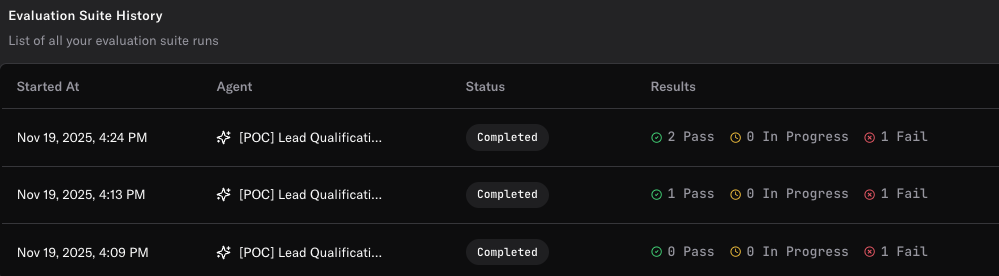
- Overall Pass Rate: See what percentage of evaluations passed.
- Individual Test Results: Drill down into each evaluation to see:
- Full conversation transcript
- Tool invocations (expected and actual)
- Why tests passed or failed
- Agent Responses: Review exact agent outputs to understand behavior.
Best Practices
- Test before deploying: Always run evaluations after making changes to your agent’s configuration before pushing to production.
- Cover edge cases: Don’t just test happy paths—include difficult scenarios, unclear inputs, and error conditions.
- Maintain a comprehensive suite: Build evaluation suites that cover all critical customer journeys and use cases.
- Update tests regularly: As you add new features or modify agent behavior, update your evaluation suites accordingly.
- Use specific success criteria: Clear, measurable criteria make it easier to identify when tests fail and why.
- Combine evaluation types: Use Next Reply for quick validations, Tool Invocation for integration testing, and Conversation for end-to-end flows.
Need more help? Reach out to our team at support@oration.ai