> ## Documentation Index
> Fetch the complete documentation index at: https://docs.oration.ai/llms.txt
> Use this file to discover all available pages before exploring further.
# Phone Number Management
> How to set up phone numbers for voice calls
## Setting Up a Phone Number
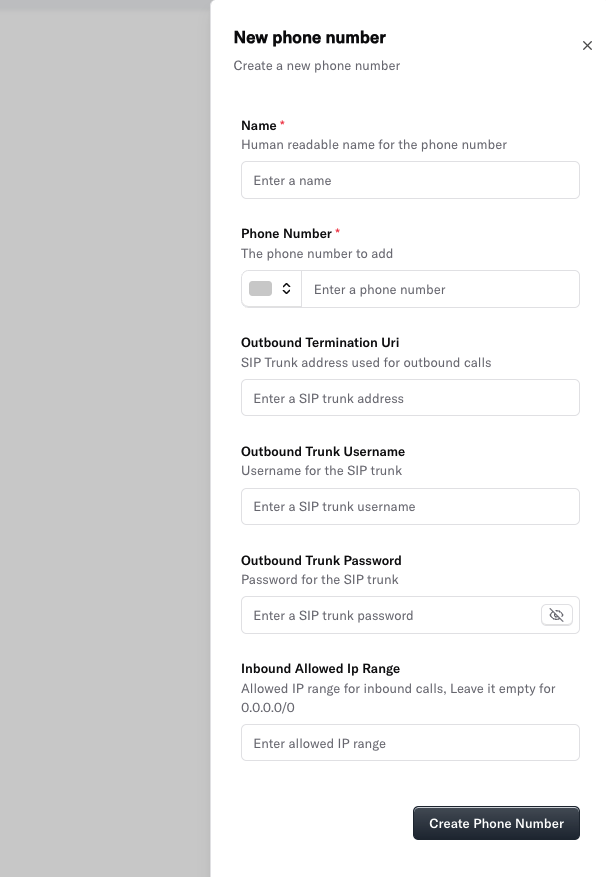
You can add a new phone number directly from the Oration AI dashboard. Here’s how to use the **New phone number** form:
 ### Field Explanations
* **Name**\
Give your phone number a human-readable name (e.g., "Support Line", "Sales Inbound").
* **Phone Number**\
Enter the phone number you want to add. This is the number your customers will call or receive calls from.
* **Outbound Termination Uri**\
The address of your SIP trunk. This is required for SIP-based phone numbers.
* **Outbound Trunk Username**\
The username for authenticating with your SIP trunk provider.
* **Outbound Trunk Password**\
The password for your SIP trunk account.
* **Inbound Allowed IP Range**\
The IP range of your SIP provider to whitelist. This is required for inbound calls received on your SIP-based phone numbers.
After filling in all required fields, click **Create Phone Number** to add the number to your Oration AI account.
In case you need help in getting these details, you can refer to our [Custom Telephony Provider](/guides/phone-numbers/custom) guide.
In case you need want to import your Twilio phone number, you can refer to our [Twilio](/guides/phone-numbers/twilio) guide.
***
## Next Steps
Once your phone number is set up, you should be able to see it in the dashboard.
### Field Explanations
* **Name**\
Give your phone number a human-readable name (e.g., "Support Line", "Sales Inbound").
* **Phone Number**\
Enter the phone number you want to add. This is the number your customers will call or receive calls from.
* **Outbound Termination Uri**\
The address of your SIP trunk. This is required for SIP-based phone numbers.
* **Outbound Trunk Username**\
The username for authenticating with your SIP trunk provider.
* **Outbound Trunk Password**\
The password for your SIP trunk account.
* **Inbound Allowed IP Range**\
The IP range of your SIP provider to whitelist. This is required for inbound calls received on your SIP-based phone numbers.
After filling in all required fields, click **Create Phone Number** to add the number to your Oration AI account.
In case you need help in getting these details, you can refer to our [Custom Telephony Provider](/guides/phone-numbers/custom) guide.
In case you need want to import your Twilio phone number, you can refer to our [Twilio](/guides/phone-numbers/twilio) guide.
***
## Next Steps
Once your phone number is set up, you should be able to see it in the dashboard.
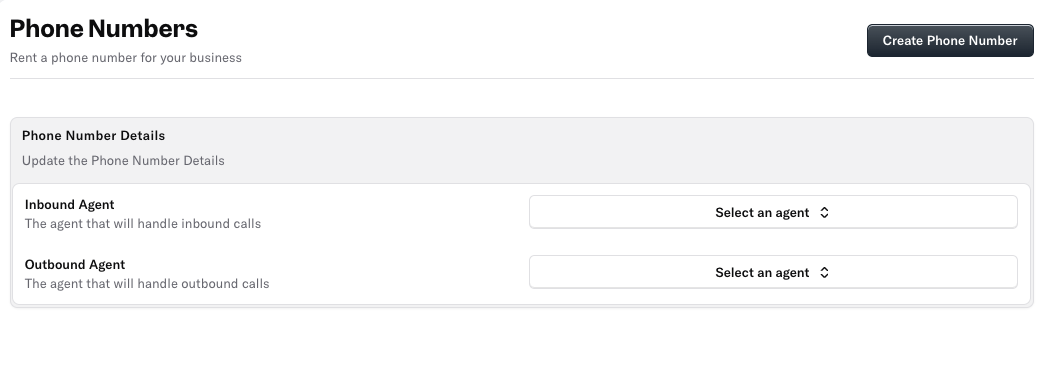
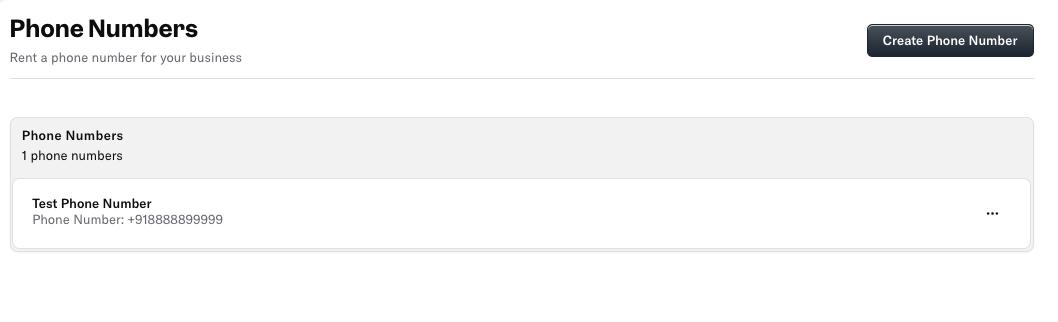 Click on that phone number to assign it to an agent for inbound or outbound calls.
 ***
## Best Practices
* Use descriptive names for each phone number to keep your setup organized.
* Double-check SIP credentials and URLs for accuracy to avoid connection issues.
* Make sure you don't use duplicate phone numbers.
***
> Need more help? Reach out to our team at [support@oration.ai](mailto:support@oration.ai)
***
## Best Practices
* Use descriptive names for each phone number to keep your setup organized.
* Double-check SIP credentials and URLs for accuracy to avoid connection issues.
* Make sure you don't use duplicate phone numbers.
***
> Need more help? Reach out to our team at [support@oration.ai](mailto:support@oration.ai)