> ## Documentation Index
> Fetch the complete documentation index at: https://docs.oration.ai/llms.txt
> Use this file to discover all available pages before exploring further.
# Uploading Customers
> A guide to uploading customer data via CSV for campaigns in Oration AI
## Uploading Customers for Campaigns
Upload your customer data via CSV to populate campaigns with targeted customer lists.
Step by step, learn how to upload and map customer data. Select **Customers** from the side navigation, choose your campaign, and click **Upload Customers** to begin.
***
## CSV Upload Process
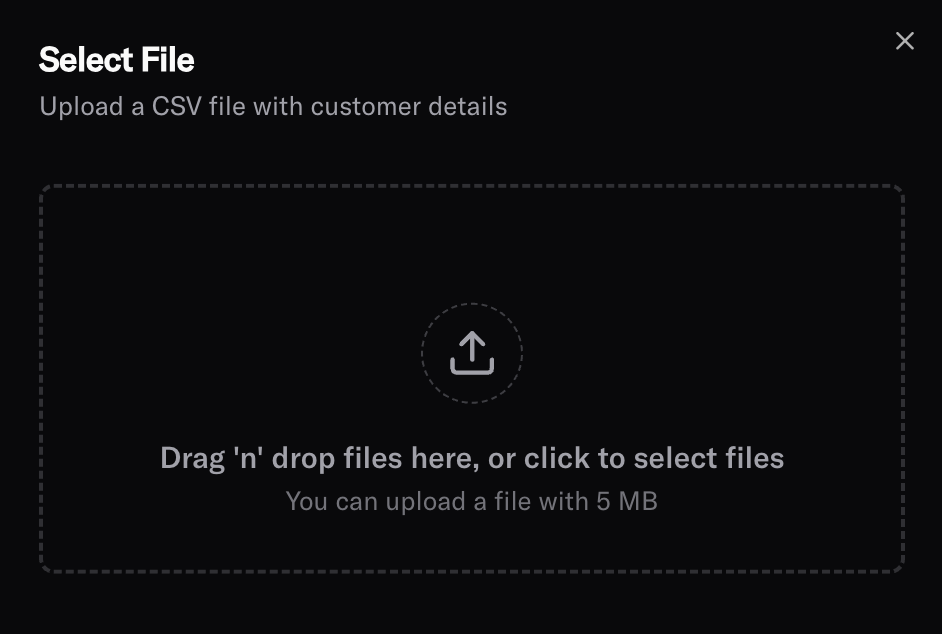 ### Upload CSV File
**Drag and drop** your CSV file or click **Browse** to select a file from your computer. The platform supports standard CSV formats with comma-separated values.
***
## CSV Field Requirements
Your CSV file must include the following mandatory fields and can optionally include dynamic variables for personalized messaging.
#### Phone Number
**phoneNumber** - The customer's phone number including ISD code
* **Format:** Must include country code prefix (e.g., `+91` for India, `+1` for US)
* **Example:** `+919876543210`, `+15551234567`
* **Required:** Yes
* **Usage:** Used as the primary contact method for AI-powered calls
#### Campaign Identifier
**campaign** - The campaign identifier
* **Purpose:** Links each customer to a specific campaign
* **Required:** Yes
* **Example:** `welcome-series-q1`, `survey-2024-customer-satisfaction`
#### Customer Identifier
**identifier** - Unique identifier for each customer
* **Purpose:** Ensures each customer is uniquely tracked in the system
* **Required:** Yes
* **Options:**
* Use phone number as identifier
* Use internal customer ID from your CRM
* Use any unique customer reference
* **Example:** `CUST-12345`, `+919876543210`, `user_67890`
### Optional Dynamic Variables
Include any additional fields that your agent's prompt uses for personalized messaging, preferably in camel case. These fields are automatically available as variables in your agent prompts.
#### Common Dynamic Variables
**customerName** - Customer's name for personalized greetings
* **Example:** `"John Smith"`, `"Priya Patel"`
* **Usage:** `Hello {{customerName}}, this is...`
**accountType** - Customer's account or subscription level
* **Example:** `"Premium"`, `"Basic"`, `"Enterprise"`
* **Usage:** `As a {{accountType}} customer, you have access to...`
**lastPurchaseDate** - Date of last interaction or purchase
* **Example:** `"2024-01-15"`
* **Usage:** `We noticed your last purchase was on {{lastPurchaseDate}}...`
**customField1, customField2, etc.** - Any other relevant customer data
* **Examples:** `"renewal_date"`, `"subscription_status"`, `"preferred_language"`
* **Usage:** Available as `{{renewal_date}}`, `{{subscription_status}}`, etc.
***
## Field Mapping Interface
### Upload CSV File
**Drag and drop** your CSV file or click **Browse** to select a file from your computer. The platform supports standard CSV formats with comma-separated values.
***
## CSV Field Requirements
Your CSV file must include the following mandatory fields and can optionally include dynamic variables for personalized messaging.
#### Phone Number
**phoneNumber** - The customer's phone number including ISD code
* **Format:** Must include country code prefix (e.g., `+91` for India, `+1` for US)
* **Example:** `+919876543210`, `+15551234567`
* **Required:** Yes
* **Usage:** Used as the primary contact method for AI-powered calls
#### Campaign Identifier
**campaign** - The campaign identifier
* **Purpose:** Links each customer to a specific campaign
* **Required:** Yes
* **Example:** `welcome-series-q1`, `survey-2024-customer-satisfaction`
#### Customer Identifier
**identifier** - Unique identifier for each customer
* **Purpose:** Ensures each customer is uniquely tracked in the system
* **Required:** Yes
* **Options:**
* Use phone number as identifier
* Use internal customer ID from your CRM
* Use any unique customer reference
* **Example:** `CUST-12345`, `+919876543210`, `user_67890`
### Optional Dynamic Variables
Include any additional fields that your agent's prompt uses for personalized messaging, preferably in camel case. These fields are automatically available as variables in your agent prompts.
#### Common Dynamic Variables
**customerName** - Customer's name for personalized greetings
* **Example:** `"John Smith"`, `"Priya Patel"`
* **Usage:** `Hello {{customerName}}, this is...`
**accountType** - Customer's account or subscription level
* **Example:** `"Premium"`, `"Basic"`, `"Enterprise"`
* **Usage:** `As a {{accountType}} customer, you have access to...`
**lastPurchaseDate** - Date of last interaction or purchase
* **Example:** `"2024-01-15"`
* **Usage:** `We noticed your last purchase was on {{lastPurchaseDate}}...`
**customField1, customField2, etc.** - Any other relevant customer data
* **Examples:** `"renewal_date"`, `"subscription_status"`, `"preferred_language"`
* **Usage:** Available as `{{renewal_date}}`, `{{subscription_status}}`, etc.
***
## Field Mapping Interface
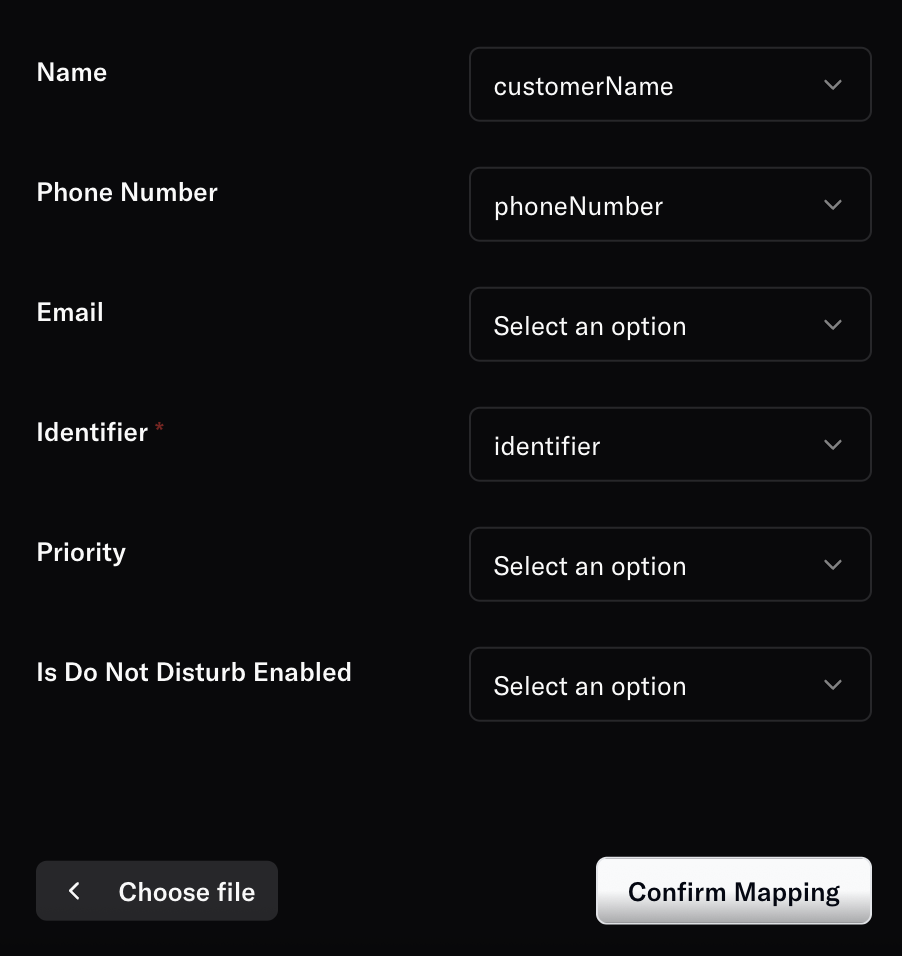 After uploading your CSV, Oration AI automatically detects column headers and suggests field mappings. Review and adjust these mappings to ensure data is correctly assigned.
***
## CSV Format Guidelines
### File Structure
```csv theme={null}
phoneNumber,campaign,identifier,customerName,customerType,lastPurchaseDate
+919876543210,welcome-series-q1,CUST-12345,John Smith,welcome-campaign,2024-01-15
+15551234567,welcome-series-q1,CUST-67890,Jane Doe,welcome-campaign,2024-02-20
+447700900123,welcome-series-q1,CUST-11111,Bob Johnson,welcome-campaign,2024-01-30
```
### Format Requirements
* **Character Encoding:** UTF-8 recommended for international characters
* **Delimiter:** Comma (,) by default
* **Header Row:** Required - first row must contain column names
* **Row Limit:** Up to 100,000 customers per upload
***
## Best Practices
### CSV Preparation
**Clean Data:**
* Remove duplicate phone numbers
* Validate phone number formats before upload
* Ensure consistent date formats (YYYY-MM-DD)
* Check for special characters in names
**Naming Conventions:**
* Use descriptive column headers
* Avoid spaces in column names (use underscores or camelCase)
* Keep field names consistent across uploads
**Data Quality:**
* Verify phone numbers are active and reachable
* Ensure customer consent for outreach
* Regular data cleansing to maintain accuracy
***
> Need more help? Reach out to our team at [support@oration.ai](mailto:support@oration.ai)
After uploading your CSV, Oration AI automatically detects column headers and suggests field mappings. Review and adjust these mappings to ensure data is correctly assigned.
***
## CSV Format Guidelines
### File Structure
```csv theme={null}
phoneNumber,campaign,identifier,customerName,customerType,lastPurchaseDate
+919876543210,welcome-series-q1,CUST-12345,John Smith,welcome-campaign,2024-01-15
+15551234567,welcome-series-q1,CUST-67890,Jane Doe,welcome-campaign,2024-02-20
+447700900123,welcome-series-q1,CUST-11111,Bob Johnson,welcome-campaign,2024-01-30
```
### Format Requirements
* **Character Encoding:** UTF-8 recommended for international characters
* **Delimiter:** Comma (,) by default
* **Header Row:** Required - first row must contain column names
* **Row Limit:** Up to 100,000 customers per upload
***
## Best Practices
### CSV Preparation
**Clean Data:**
* Remove duplicate phone numbers
* Validate phone number formats before upload
* Ensure consistent date formats (YYYY-MM-DD)
* Check for special characters in names
**Naming Conventions:**
* Use descriptive column headers
* Avoid spaces in column names (use underscores or camelCase)
* Keep field names consistent across uploads
**Data Quality:**
* Verify phone numbers are active and reachable
* Ensure customer consent for outreach
* Regular data cleansing to maintain accuracy
***
> Need more help? Reach out to our team at [support@oration.ai](mailto:support@oration.ai)